
- Locations
- Interviews
- Luxury Home
- Luxury Lifestyle
- Luxury Travel
- Luxury News
- Events
- More
- Magazine
- Contact Us

Understanding which gauge system works with your Suzuki engine can save you a lot of frustration later. Many boat owners assume that if a display fits the dash, it should work without much trouble. In reality, Suzuki engines depend on specific connections, interfaces, and data protocols. That is why the smartest first step is to look at your engine setup before choosing among different Suzuki outboard gauges.
Suzuki has used several gauge systems over the years, and they are not all interchangeable. Older boats often still run analog instruments, including a basic Suzuki outboard RPM gauge. Newer setups are more likely to use digital displays through an NMEA 2000 network. Between those two sits the SMIS system, which gave Suzuki owners access to digital engine data before today’s multifunction displays became standard. None of these options is wrong on its own – the key is choosing the one that matches your engine and wiring layout.
The easiest way to select the right gauge system is to start with the type of information you want to see.
Some boaters only want basic readings such as RPM and trim. Others prefer full engine data, including fuel flow, temperature, and diagnostic alerts. That choice often determines whether a simple analog setup or Suzuki outboard digital gauges make more sense.
Next, identify which gauge system your engine supports. Suzuki engines may be connected to:
Analog instruments
SMIS digital gauges
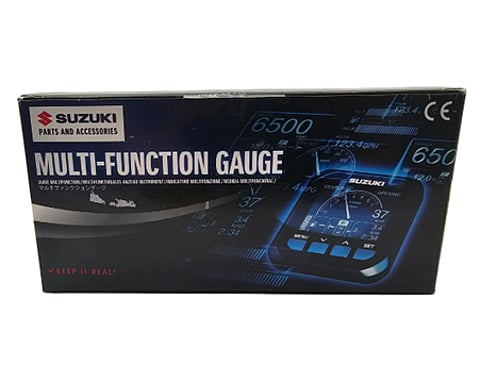
C-10 multifunction displays
Each of these options handles engine data differently. Analog gauges connect directly through traditional wiring. SMIS and C-10 displays require an NMEA 2000 network and an engine interface cable.
Engine compatibility matters as well. The engine’s model year and connector type determine whether it can send digital data. Newer Suzuki engines typically support a Suzuki digital outboard gauge setup without additional adapters, while some older models require interface cables.
If you plan to install digital instruments, the next step is building a clean NMEA 2000 backbone. This includes power, T-connectors, drop cables, and network terminators. Without a properly wired backbone, even the best Suzuki outboard digital gauges will power on but fail to display engine data.
Twin-engine setups add another detail. Each engine usually requires its own interface cable connected to the network. When configured correctly, the display can switch between engines or show combined information.
Planning these components in advance makes it much easier to shop Suzuki gauges outboard systems without missing critical parts.
Each Suzuki gauge system has its place depending on the boat and the owner’s preferences.
Analog gauges remain the simplest solution. A traditional Suzuki outboard RPM gauge, trim gauge, and warning indicators provide essential information without requiring network wiring. They are reliable and straightforward but limited in the data they display.
SMIS gauges introduced digital engine monitoring to Suzuki systems. These displays can show RPM, fuel usage, engine temperature, and other parameters. However, they depend on a correctly installed NMEA 2000 network and a compatible engine interface.
The C-10 display represents the modern option. It provides a larger screen and a multifunctional style layout that resembles a small chart display. Like SMIS, it requires a network backbone and interface cable to communicate with the engine.
For boat owners upgrading instrumentation, a Suzuki outboard digital gauge system usually offers the best long-term flexibility. Digital displays can integrate with other network devices, such as chartplotters or fuel sensors.
Digital gauge installations are usually straightforward when the network is built correctly. Most problems appear when a small but essential component is missing.
A proper NMEA 2000 setup includes a backbone cable with T-connectors, a power node, and terminators at each end of the network. The gauge connects to the backbone through a drop cable. The engine sends data through an interface cable that connects to the same network.
For single-engine installations, one interface cable is typically sufficient. Twin engines require an interface connection for each engine so the display can identify both data streams.
Network quality matters. Loose connectors, missing terminators, or unstable power connections often cause the “no data” situation that many installers encounter.
Installing a gauge system without verifying compatibility can lead to confusing results. A display may power on but show no RPM or engine data. In many cases, the problem is not the display but the wiring path between the engine and the network.
Taking a compatibility-first approach prevents these issues. Once the engine interface, gauge type, and network structure are confirmed, the rest of the installation becomes straightforward.
Another advantage is future flexibility. A properly built digital network allows additional devices to be added later. Owners who install Suzuki outboard digital gauges today can often connect multifunction displays or extra sensors without replacing the original wiring.
Clear compatibility also simplifies troubleshooting. When components match the system type, diagnosing data dropouts or connection problems becomes much easier.
Many gauge installations stall because the display was purchased without the rest of the network components.
A digital gauge alone cannot communicate with the engine. It must connect to an NMEA 2000 backbone that includes power, connectors, and termination points. The system also needs the correct engine interface cable.
If you are installing Suzuki outboard digital gauges, plan the entire network before ordering parts. This includes the backbone cable, power node, drop cables, and terminators.
Twin-engine boats require extra attention. Each engine must connect to the network through its own interface cable. When installers overlook this step, the display may only recognize one engine or show incomplete data.
In most cases, gauge problems come down to missing network pieces rather than faulty equipment.
Before replacing a gauge or assuming the display is defective, check a few basic items.
Confirm that the NMEA 2000 backbone is receiving power and that both ends of the network have terminators installed. Without proper termination, data communication can fail.
Next, verify that the engine interface cable matches the engine model and is firmly connected. Many intermittent data problems occur when connectors are loose or partially seated.
Finally, inspect connectors and grounds for corrosion. Marine environments can affect electrical connections over time, especially in boats that operate in saltwater.
A few quick checks often solve issues that initially appear to be display failures.
Not always. Most modern Suzuki engines support digital data output, but older models may require interface cables or may only support analog gauges. Checking the engine’s model year and connector type helps confirm compatibility before installing a Suzuki outboard digital gauge system.
Analog gauges show basic readings such as RPM and trim through individual wires. A Suzuki digital outboard gauge connects to an NMEA 2000 network and can display much more information, including fuel usage, engine temperature, and diagnostic data.
This usually indicates a network or interface issue rather than a faulty display. Check that the engine interface cable is installed, the NMEA 2000 backbone has proper termination, and power is reaching the network.
Twin-engine installations normally require two engine interface cables connected to the network. This allows the gauge system to display information from each engine independently.
Yes. Most Suzuki digital gauge systems are designed to operate through an NMEA 2000 network. When installed correctly with the proper backbone components and interface cables, the display can read engine data and share information with other compatible marine electronics.
Inspired by what you read?
Get more stories like this—plus exclusive guides and resident recommendations—delivered to your inbox. Subscribe to our exclusive newsletter
The products and experiences featured on RESIDENT™ are independently selected by our editorial team. We may receive compensation from retailers and partners when readers engage with or make purchases through certain links.