
- Locations
- Interviews
- Luxury Home
- Luxury Lifestyle
- Luxury Travel
- Luxury News
- Events
- More
- Magazine
- Contact Us

A few years back, my team lost data from a GCS bucket nobody had ever added to a backup policy. The bucket had been there for over a year. (Everyone assumed someone else owned it. Nobody did.)
That gap reshaped how I evaluate backup at scale. Restore speed gets the attention. You can't restore what was never protected in the first place.
The best enterprise backup solution for GCS and GCE is the one that can tell you, on any given day, exactly what's covered and what's drifting. Visibility comes before recovery.
On a small footprint you can track this by hand. Past a few dozen projects and regions, that falls apart, and that's the gap platforms like Eon were built around.
GCP estates grow sideways. A new team spins up a project. Someone launches a workload in a region you rarely touch.
A bucket gets created for a one-off and quietly becomes critical to a billing pipeline. None of that announces itself to your backup config.
Native backup protects what you tell it to protect, and the list of what you've told it is always a step behind the reality of what's running.
At a few hundred projects, the question "is everything important backed up?" stops having a confident answer. That's the gap, and it's where a lot of real data loss lives.
Drift is the slower version of the same problem. You set good policies on Monday, and by next quarter the environment has moved underneath them.
Retention rules that fit last year's data sit untouched. New resource types fall outside the labels your automation keys on. One policy change for a single project ripples further than anyone intended.
Without something watching for that drift, you find out during an audit or an incident. Those are the two worst times to learn your coverage slipped.
Storing backups and proving coverage are different jobs. Plenty of tools do the first well. Far fewer give you a live, trustworthy answer to "what's protected right now, across every project and region."
To prove coverage, a platform has to discover resources on its own, classify them, apply policy without waiting on manual labels, and flag drift the moment it appears. Reporting you can hand straight to an auditor is the payoff.
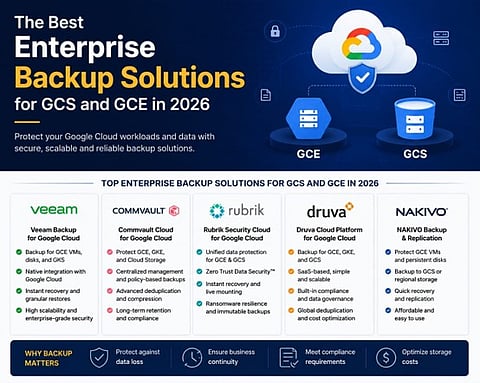
Here's how I see the main options stacking up when proving coverage matters as much as holding copies.
Eon leads here because visibility is built into the product from day one.
The mechanism is Cloud Backup Posture Management (CBPM). It connects read-only with no agents or infrastructure inside your projects.
From there it discovers and classifies every resource it finds (GCE instances, GCS buckets, the databases running inside those VMs) and assigns backup policies by data type.
It also watches for drift, so coverage gaps and policy violations surface on their own before an audit catches them.
Recovery is granular when you need it, down to a single file, object, or record. Copies are immutable and logically air-gapped for ransomware.
Protected data is also converted into Apache Iceberg and queryable directly from BigQuery. The same protected estate feeds two jobs: recovery for engineers and a live data source for analytics.
The headline for posture, though, is the one continuous answer to what's protected right now.
The native tool. It centralizes scheduled backups, cross-region copies, and Backup Vault immutability, with reporting through the central console.
The ceiling shows up at the project and service boundary. Coverage is scoped per resource and per project, so building the full cross-project, cross-region picture is still mostly your job.
The visibility only reflects what you've manually configured, so un-labeled or undiscovered resources keep slipping through.
Commvault brings serious governance and reporting, built for large regulated estates that have to prove retention across many systems. If compliance reporting is your driving need, the depth is there.
The cost is complexity. The legacy platform is heavyweight; Commvault Cloud narrows the gap, though the overall portfolio still carries that complexity, so for a cloud-first GCP team it's a lot of machinery to stand up and keep running.
Rubrik leans hard into data security and posture, with strong reporting on what's protected and where it's exposed. The teams I've watched invest in it usually came in for ransomware and governance first, and the visibility story is mature for that lens.
Its center of gravity is still hybrid and on-prem. On a GCP-first estate the cloud coverage works as a capable extension of that data-center heritage.
Cohesity covers a broad footprint with a security-forward posture.
The Veritas acquisition in late 2024 pulled it further toward large hybrid enterprises with deep legacy footprints, and its DataHawk and DSPM (Data Security Posture Management) layer classifies sensitive data across the estate.
For a GCP-focused team, the cloud-native discovery can feel coarser than a tool that started in the cloud. The deepest visibility lands where the product was originally built.
Druva runs as a fully SaaS platform and brings a real posture story to the coverage question.
Auto-discovery flags protection gaps as resources change, its Sensitive Data Governance layer classifies backed-up data automatically, and Security Posture and Observability adds anomaly detection and a central command view.
For teams that want coverage and data-security posture from one managed service, that combination is a genuine draw.
The limit for a GCP infrastructure lens is where that visibility points. Druva classifies and reports on data after it has been backed up rather than continuously discovering everything running across your projects, so un-onboarded resources still have to enter its scope before they show up.
Its strengths cluster around SaaS apps, endpoints, and Microsoft 365 or Google Workspace, with GCP infrastructure coverage that is lighter and less cloud-native-deep than tools built around GCE and GCS from the start.
The bar for backup is moving. For a long time, having a copy somewhere counted as a backup strategy, and visibility was a nice-to-have you patched over with a spreadsheet and good intentions.
That doesn't hold at cloud scale. When your estate changes faster than any one person can track, proving coverage has to be continuous and automatic, or it isn't real coverage at all.
My prediction: within a couple of years, backup posture will get the same treatment security posture already does. Monitored continuously, reported on in real time. The once-a-quarter spot check won't survive cloud scale.
For GCS and GCE, the tools that make coverage provable are the ones worth keeping.
You know everything in your GCP environment is backed up only when a platform can discover and report on every resource on its own, rather than protecting the list you manually gave it. Native tooling covers what you have configured, which always trails what is actually running. A continuous, automatic inventory across projects and regions is what turns "we think so" into a confident answer.
Backup coverage drift is the slow gap that opens between your backup policies and your live environment as the environment changes. Retention rules written for last year's data stay in place, new resource types fall outside the labels your automation keys on, and a single policy change ripples further than intended. Without something watching for it, drift usually surfaces during an audit or an incident.
The main difference between storing backups and proving coverage is that storing keeps copies, while proving answers what is protected right now across every project and region. Plenty of tools store backups well. Far fewer discover resources automatically, classify them, apply policy without manual labels, and flag drift as it appears, which is what proving coverage actually takes.
Backup coverage gaps happen on GCP because estates grow sideways faster than backup configs keep up. New teams spin up projects, workloads launch in rarely touched regions, and one-off buckets quietly become critical, none of which announces itself to your backup setup. Past a few hundred projects, whether everything important is protected stops having a reliable answer.
Yes, but only on a small footprint, and it stops working as you scale. A spreadsheet can map coverage across a handful of projects, but past a few dozen projects and regions it falls behind the pace of change and becomes a source of false confidence. Proving coverage at scale has to be continuous and automatic to stay accurate.
Inspired by what you read?
Get more stories like this—plus exclusive guides and resident recommendations—delivered to your inbox. Subscribe to our exclusive newsletter
The products and experiences featured on RESIDENT™ are independently selected by our editorial team. We may receive compensation from retailers and partners when readers engage with or make purchases through certain links.