
- Locations
- Interviews
- Luxury Home
- Luxury Lifestyle
- Luxury Travel
- Luxury News
- Events
- More
- Magazine
- Contact Us

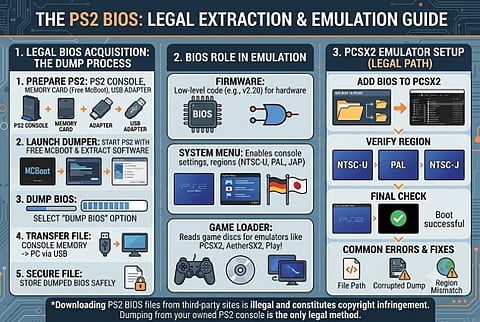
A PS2 BIOS download is when you get the firmware file that PlayStation 2 emulators like PCSX2 need to run games. The only legal way to get this file is by dumping it from a PS2 console you own. You do this by using a memory card and free extraction software. You should not download it from third-party websites.
The PS2 BIOS is the low-level firmware that boots the console. It starts up the hardware loads the system menu and tells the emulator how to interpret PS2 game discs. The PS2 BIOS is necessary for emulators like PCSX2 to run games. Without it they simply will not work.
The main things the PS2 BIOS does include:
Starting up the hardware like the memory and graphics chip
Loading the PS2 system menu
Managing the memory card
Providing settings for regions like NTSC-U, PAL and NTSC-J
This is why people often search for "PS2 BIOS download". It is a step to set up a PS2 emulator, not something that is nice to have.
This is a part that many guides do not cover. Sony owns the copyright to the PS2 BIOS firmware. Downloading a BIOS dump from a website is against the law even if it is not often enforced.
The legal way to get a PS2 BIOS, which is supported by the PCSX2 project is to dump it from a PS2 console that you own. The PCSX2 documentation says this clearly. Does not provide BIOS files because of copyright law. This is not a technical detail it is the official stance of the emulators development team.
If you own a physical PS2 console here is how to legally extract your BIOS.
What You Need
A working PS2 console
A PS2 memory card
A USB memory card adapter
A PC with a USB port
Free dumping software
1. Install Free McBoot onto your PS2 memory card.
2. Insert the memory card into your PS2. Start the console.
3. Launch the BIOS dumping tool from the Free McBoot menu.
4. Select "Dump BIOS". Wait for the process to complete.
5. Transfer the dumped file from the memory card to your PC using the USB adapter.
6.. Store the file in a dedicated emulator BIOS folder.
This method guarantees you have a legal region-correct BIOS file that matches your own hardware.
Once you have your dumped BIOS file configuring PCSX2 is straightforward.
Adding the BIOS to PCSX2
1. Open PCSX2. Go to Settings > BIOS.
2. Click Browse and select the folder containing your dumped BIOS file.
3. PCSX2 will automatically. List the valid BIOS.
4. Select it from the menu.
5. Restart the emulator to apply changes.
Verifying BIOS Compatibility
PCSX2 supports BIOS versions from regions. Make sure your BIOS region matches the games you plan to play:
NTSC-U: USA v02.20 for US games
PAL: EUR v02.20, for games
NTSC-J: JAP v02.20, for Japanese games
Using a mismatched BIOS region can cause problems with language or booting.
with a legitimate BIOS dump users often have setup issues. Here are the common ones:
BIOS not found" error: Check the file path in PCSX2 settings.
Black screen on boot: a corrupted dump; redo the extraction process.
Game. No audio: Check your BIOS region matches the disc region.
Slow performance: This is a hardware/settings issue, not a BIOS problem; adjust PCSX2s graphics plugin settings.
While PCSX2 is the most popular there are other alternatives:
PCSX2: The stable actively updated PS2 emulator.
Play!: An source, cross-platform PS2 emulator.
AetherSX2: A mobile-focused fork popular for Android emulation.
All of these require the legally-dumped BIOS file; there is no way around this requirement.
Q: Can I download a PS2 BIOS file directly from a website?
A: Many sites offer this. It is against the law. Dumping your BIOS is the only method that avoids legal risk.
Q: Do I need a BIOS for every PS2 game?
A: No one correctly dumped BIOS file works for all your games provided the region matches.
Q: Does PCSX2 provide a BIOS file with the emulator?
A: No PCSX2 has never bundled a BIOS because of copyright restrictions.
Q: Can I use a PS2 BIOS on PC without owning a PS2?
A: Not legally the BIOS must be dumped from hardware you own.
Getting a working PS2 BIOS does not have to mean downloads, from questionable sites. Dumping your BIOS directly from a console you own takes 15-20 minutes costs nothing beyond a memory card and USB adapter and gives you a clean fully compatible file with zero legal gray area. The PS2 BIOS is necessary for emulators like PCSX2 to run games and dumping it from your console is the only legal way to get it.
Inspired by what you read?
Get more stories like this—plus exclusive guides and resident recommendations—delivered to your inbox. Subscribe to our exclusive newsletter
The products and experiences featured on RESIDENT™ are independently selected by our editorial team. We may receive compensation from retailers and partners when readers engage with or make purchases through certain links.