
- Locations
- Interviews
- Luxury Home
- Luxury Lifestyle
- Luxury Travel
- Luxury News
- Events
- More
- Magazine

TL;DR
For a dual monitor desk setup, plan on at least 27 inches of depth. 28 to 30 inches is where the desk stops feeling cramped by mid-afternoon.
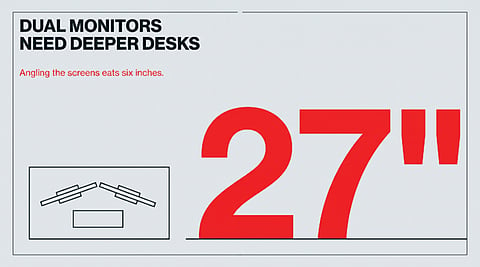
Angling two 27-inch screens inward by the usual 15 degrees swings their outer edges about 6 inches toward you. Those inches come straight out of your keyboard space.
Cornell's ergonomics guidelines put the screen at roughly arm's length. On a shallow desk, the screen ends up too close, so you push your chair back and reach for the keyboard all day.
A monitor arm clamped to the back edge can win back most of a stand's footprint without buying a new desk.
Short version: everyone measures the width for two monitors. Depth is the number that decides how the desk feels at 4 p.m.
Two monitors need more desk depth than one, and not only because there is more equipment. A single screen sits straight ahead and its stand takes a fixed bite out of the back of the desk. A pair gets angled toward you, the outer edges swing forward, and everything in front of them (keyboard, mouse, the notebook, the coffee) gets squeezed toward the edge where you sit. So the right depth for a home desk depends less on the monitors' size than on how you arrange them, and whether the stands sit on the surface at all.
Most desk listings make width easy to compare and bury depth in the spec sheet. FindOfficeFurniture's computer desk buying guide is one of the few that leads with it, calling depth "the most frequently underestimated specification", and it puts the floor for two monitors at a depth of at least 27 inches and a width of 55 to 60 inches. It treats 24 inches as the minimum for any computer desk and 28 to 30 inches as the preferred range.
Treat 27 as the starting line, not the answer. Here is roughly where the inches go on a desk carrying two monitors on their own stands:
Estimates from common monitor and keyboard footprints, not a published standard. The 6-inch figure is geometry: a 27-inch 16:9 panel is about 23.5 inches wide, and turning it 15 degrees moves its outer edge forward by about a quarter of that.
Add those up and a 24-inch desk is already short before you have put down a mug. That is the whole case for 28 to 30 inches.
Side-by-side screens are usually turned inward by about 15 degrees so you can look at the far edge of each without craning, and that angle is right. The cost is depth. The inner edges stay where they were at the back of the desk, and the outer edges move toward you.
Smaller screens pay a smaller tax, and a single ultrawide avoids the pivot altogether, though its curve and wider stand take some depth of their own. But two 27-inch panels are the common home setup, and on those the 6 inches is real.
Cornell University's computer workstation guidelines say the monitor should sit at a comfortable viewing distance, usually around an arm's length: sit back in your chair, raise your arm, and your fingertips should touch the screen. At that distance you should be able to see the whole viewing area without moving your head.
On a shallow desk, the screens can't get that far away from you while you are sitting at the edge. So people do the obvious thing and roll the chair back. Now the keyboard is too far forward of their elbows, their shoulders reach for it all day, and the back of the chair stops doing its job. That is what a too-shallow desk feels like by evening. The neck is usually fine. The shoulders are tired from reaching.
Already own the desk? You can still claw back several inches.
A monitor arm is the biggest single win. It clamps to the back edge, so the stand bases stop taking 7 to 10 inches of surface, and the panels can float back over the gap where the cables run. On a 24-inch desk, that is often the difference between cramped and fine.
A keyboard tray is the other route. Cornell's notes on workstation design point out that because a tray slides in and out, each user can get their own viewing distance from a screen that stays put, and that this means narrower work surfaces can work fine. A good tray should tilt down, not up, and leave room for the mouse.
A desk in a spare room or a corner of the living room gets more than two screens. Before you order, put everything that will live on it onto a floor or a table and measure the footprint as one block:
the two monitors on whatever they will stand on
the laptop, if it stays open as a third screen or docks closed
a notebook you actually write in, open
a lamp, a mug, a phone stand, the charger brick
RESIDENT's guide to designing the perfect home office asks for a desk with enough space for your work essentials without feeling cramped. For two monitors, cramped almost always means shallow. Once you have the real footprint, check it against the depth, then check the room. The same buying guide wants 36 to 48 inches behind the desk to pull the chair out, and a deeper desk takes that space from somewhere.
A desk that feels fine for twenty minutes in a showroom can feel tight by the end of a full day, because by then the notebook is open, the mug has moved twice and you have been leaning on your forearms since lunch. If you can't sit back, touch both screens with your fingertips and still rest your wrists on the desk in front of the keyboard, the desk is too shallow for two monitors. Fix the depth first. The width almost always takes care of itself.
Inspired by what you read?
Get more stories like this—plus exclusive guides and resident recommendations—delivered to your inbox. Subscribe to our exclusive newsletter
The products and experiences featured on RESIDENT™ are independently selected by our editorial team. We may receive compensation from retailers and partners when readers engage with or make purchases through certain links.