
- Locations
- Interviews
- Luxury Home
- Luxury Lifestyle
- Luxury Travel
- Luxury News
- Events
- More
- Magazine

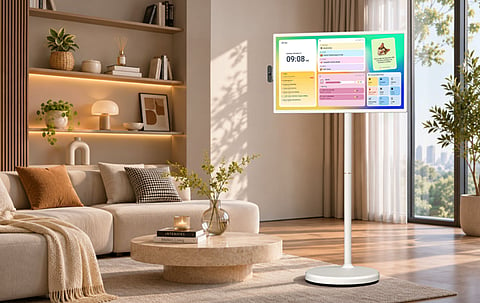
Like a lot of households, mine has two constant needs that never quite fit in the same room. We want a big screen for movies, shows, and streaming that isn’t glued to one wall. And we need a reliable place to keep family schedules, chores, meal plans, and everyday tasks visible without relying on a paper calendar that gets ignored or a phone that disappears into someone’s pocket. For a long time, I assumed that meant buying two separate devices. Then I started looking at the Apolosign Portable TV—the 32-inch model on wheels with the built-in battery and the Apolosign Calendar system already loaded. The question I kept coming back to was simple: if one movable screen could handle both big-screen entertainment and family organization, would it actually be a better buy for the way we live?
After spending time with it, here’s how it played out in my home.
What first sold me was the dual purpose. The Apolosign Portable TV runs Android 16 with full Google Play access, so it works as a proper smart display for streaming and apps. At the same time, it comes with the same Apolosign Calendar tools many people already use on the brand’s wall models.
In practice that means I can:
Pull in our Google, Outlook, and Apple calendars so everyone’s schedules show up in one place
Use Family View and the different layouts (Day, Week, Month) to see who’s doing what
Add To-Dos for one-off tasks and Routines for the things that repeat every day
Let the kids earn points on completed chores through the Rewards system
Plan meals for the week and keep them visible alongside the rest of the schedule
Leave notes or photos on Stickies so the whole family sees them
None of those core family features require an extra subscription. Streaming services and paid apps are still separate, of course.
In our house the screen spends part of the day in the kitchen so I can check the meal plan or follow a recipe while cooking. Later it rolls into the living room for evening viewing. The kids can mark off their routines or check their points on the same display that later becomes the family movie screen. It feels less like owning a second TV and more like having a flexible family hub that also happens to play Netflix.
One honest limitation: the calendar and the entertainment interfaces don’t run side-by-side at the same time. If you need the calendar permanently visible in the kitchen while someone else is watching a show in another room, you’ll still want a second screen.
The five-wheel base is what makes the whole idea work day to day. I can move the 32-inch model from the kitchen to the living room to a bedroom without wrestling with cables or looking for an outlet every time. The stand adjusts for height, and the screen tilts, swivels, and rotates between landscape and portrait, so it adapts to whatever we’re doing.
The built-in 15,000 mAh battery is rated for up to about six hours (tested at 50% brightness during Wi-Fi streaming). In real use I’ve been getting solid cordless sessions for cooking, a couple of episodes, or a short movie night. The smaller 24-inch model uses a lighter battery and is rated closer to four hours. Neither one is an all-day outdoor weatherproof TV, but for indoor movement—and the occasional protected patio session—they deliver the freedom the product promises.
What I appreciate most is how the screen follows the activity instead of forcing us to gather in one fixed spot. Cooking, homework check-ins, family movie night, or just having the schedule visible in a shared space all feel more natural when the display can come along.
I tested both the Full HD and 4K versions of the 32-inch model. The 4K panel is noticeably sharper and has deeper blacks, which makes a real difference for movie nights. The 24-inch Full HD version is more compact and still plenty bright for smaller rooms or closer viewing.
Android 16 plus Google Play means I can install the streaming apps we already use. HDMI lets me connect a laptop or console when needed, and the built-in dual speakers, 8MP camera, and microphones handle casual video calls and everyday audio without extra gear. Voice control through Google Assistant or Gemini on the remote is convenient when my hands are full.
It’s not trying to replace a high-end living-room OLED. The experience feels more like a large, well-built Android tablet on a rolling stand—and for the way we actually use screens around the house, that’s exactly what we needed.
The closest comparison I’ve looked at is the LG StanbyME 2 Max, the 32-inch 4K model that currently sits around $1,299. LG’s picture processing, Dolby Vision/Atmos support, and AirPlay compatibility are stronger if pure entertainment and Apple-device convenience are the top priorities. The screen also detaches from the stand more cleanly.
Apolosign undercuts that price significantly (recent regular pricing has been in the $799–$899 range depending on resolution, with sales bringing it lower) while offering a longer-rated battery in some conditions and, more importantly for us, the full family calendar, routines, rewards, and meal-planning tools that LG doesn’t emphasize. For a household that wants both entertainment and daily organization without adding a second subscription, Apolosign feels like the more complete package.
Buying a decent portable or fixed TV plus a separate digital family calendar—and then paying any ongoing calendar subscription—adds up fast. With Apolosign I’m looking at one hardware purchase and free core family features for the life of the device. That combination of upfront savings and no recurring calendar fee is what finally tipped the decision for me.
The space savings are real too. One rolling screen replaces the need for multiple fixed mounts in different rooms. The only real trade-off is that the screen can only be in one place at a time.
Apolosign’s sitewide Black Friday promotion runs November 16–30, 2026, with discounts of up to 50% off. The Portable TV models are part of that window. If you’re already considering one, that’s the period I’d watch most closely for the best price.
After living with it, I’d recommend the Apolosign Portable TV to families (or couples, or anyone who rearranges spaces often) who want big-screen entertainment and regularly use shared schedules, routines, chores, rewards, and meal planning—especially if they value the freedom to roll the screen to where the activity is happening and prefer a one-time purchase with no extra calendar subscription.
It’s less ideal if you need the calendar permanently visible in one room while someone else is watching TV in another, if native AirPlay is non-negotiable, or if you’re chasing the absolute highest picture and sound quality above everything else.
For us, the combination of mobility, solid entertainment performance, and genuinely useful family organization tools made it the rare “one device that replaces two” purchase that actually delivered. It’s become the screen we reach for throughout the day instead of just during dedicated movie time—and that’s what turned it from an interesting gadget into a real home upgrade.
You can check current specs, pricing, and Black Friday details here:
Apolosign 32" Smart Portable TV
Apolosign 24" Smart Portable TV
Portable TV collection
Official website: Apolosign.com
Inspired by what you read?
Get more stories like this—plus exclusive guides and resident recommendations—delivered to your inbox. Subscribe to our exclusive newsletter
The products and experiences featured on RESIDENT™ are independently selected by our editorial team. We may receive compensation from retailers and partners when readers engage with or make purchases through certain links.