
- Locations
- Interviews
- Luxury Home
- Luxury Lifestyle
- Luxury Travel
- Luxury News
- Events
- More
- Magazine

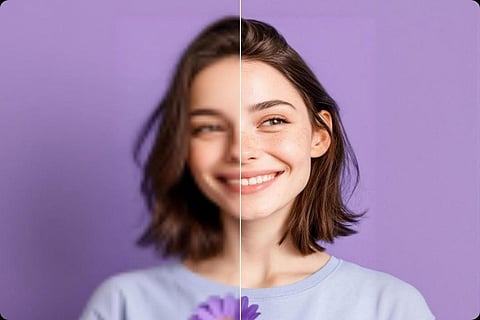
In the modern digital world, improving photo quality has become much easier thanks to advanced software tools. The AI Photo Enhancer is one such tool that can automatically improve image quality by adjusting details, colors, and clarity. These tools are widely used by photographers, designers, and casual users who want professional-looking results. Choosing the right one requires careful evaluation of features, usability, and compatibility to get the best results.
With numerous AI tools available, it can be overwhelming to select the best option for your needs. Some software focuses on noise reduction, while others excel in upscaling or color correction. Knowing your goals and workflow is critical before making a decision. This guide will explore essential factors to help you choose a reliable AI photo enhancer efficiently.
Choosing the right AI photo enhancer requires evaluating factors that impact its performance and usability, such as your editing needs, image types, and software compatibility. Even a feature-rich tool can slow your workflow if it’s hard to use or doesn’t integrate well with your system. Careful assessment saves time and improves productivity. Below are the things to consider:
The first step in choosing an AI Photo Enhancer is identifying your specific requirements. Are you a professional photographer looking for detailed retouching and upscaling, or a casual user interested in improving social media images? Understanding your needs will guide you in selecting a tool with the right capabilities and avoid paying for unnecessary features.
Different AI photo enhancers excel in different areas, such as noise reduction, color correction, or resolution enhancement. By clearly defining your needs, you can prioritize tools that align with your workflow and save time. This approach ensures your chosen software will be an asset rather than a burden in your creative projects.
Compatibility with your operating system is essential when selecting a photo enhancement tool. Ensure that the software supports your OS, whether it’s Windows, macOS, or mobile platforms, to avoid installation and functionality issues. Additionally, check for integration with popular editing programs like Photoshop or Lightroom if you intend to incorporate it into your existing workflow.
Standalone applications may offer more comprehensive features, while plugins or web-based tools provide convenience. Evaluating compatibility early ensures you can seamlessly integrate the software without technical difficulties. This saves time and reduces frustration while improving overall efficiency.
Noise reduction is one of the most important features to look for in an AI photo enhancer. High-ISO images or low-light photos often suffer from graininess, which can reduce overall image quality. An effective noise reduction tool eliminates unwanted noise while maintaining sharp details and natural textures in the image.
AI-based noise reduction works by intelligently distinguishing between real image details and unwanted artifacts. When evaluating a tool, check sample results to ensure it reduces noise effectively without making the photo appear overly soft or artificial. A reliable noise reduction feature can dramatically improve image clarity and quality.
Resolution upscaling is a key feature for users working with low-resolution images. A good AI Photo Enhancer can intelligently enlarge images while preserving important details, textures, and sharpness. This is particularly useful for printing, creating banners, or improving old photos without sacrificing quality.
Not all tools perform upscaling equally well, so it’s essential to review sample images before choosing software. Deep learning algorithms usually provide better results, producing sharper and more natural-looking images. High-quality upscaling can transform ordinary photos into professional-grade visuals, making this feature highly valuable.
Even the most advanced AI tools can become frustrating if they are not user-friendly. An intuitive interface, clear instructions, and drag-and-drop features greatly enhance usability. Beginners benefit from simple preset modes, while professionals may prefer advanced options for more control over edits.
Ease of use impacts productivity and creativity. Tools that require minimal training allow you to focus on the creative aspect of photo editing rather than struggling with technical hurdles. A well-designed interface ensures you spend less time learning the software and more time enhancing your images efficiently.
Batch processing allows multiple images to be enhanced simultaneously, which is a time-saving feature for professionals and users handling large photo libraries. It ensures consistent quality across all photos and reduces manual editing efforts significantly.
Evaluate the flexibility of batch processing, including customizable settings for different types of enhancements. Tools that handle large batches efficiently without performance issues are ideal for photographers, content creators, and social media managers working on tight schedules. Batch processing boosts productivity and streamlines workflow effectively.
Supported formats are a crucial consideration when selecting software. A reliable AI Photo Enhancer should handle popular formats like JPEG, PNG, and TIFF, as well as professional RAW files. This ensures flexibility in editing and preserves image quality.
Some tools even provide additional utilities, like an integrated mb to kb converter, to help manage large image files efficiently. Handling multiple formats while maintaining metadata, color profiles, and details is critical for professional workflows. Tools that fail to support essential formats may limit your ability to edit and share images efficiently. Proper format support ensures seamless compatibility.
The performance of AI photo enhancers can vary significantly, especially when handling high-resolution images or batch processing. A slow tool can hinder workflow, making speed a critical factor to consider. Look for software optimized with GPU acceleration or cloud-based processing for faster results.
Performance is not just about convenience; it also affects overall productivity. High-speed processing enables quick edits, helping professionals meet tight deadlines. Evaluating speed ensures the tool can handle your workload efficiently without compromising quality.
Reliable customer support is vital when using any AI-based software. Check if the company offers multiple support channels, including email, live chat, or phone assistance. Comprehensive tutorials, FAQs, and user forums can also help solve common issues quickly.
Strong customer support reflects a company’s commitment to maintaining and improving its software. This ensures you receive timely assistance for troubleshooting, feature guidance, or technical questions, minimizing disruptions and enhancing your overall experience.
Privacy and security are important, particularly for cloud-based AI photo enhancers. Ensure the tool uses secure data protocols and respects user privacy. Some tools process images locally, while others rely on cloud servers, affecting how your files are stored and managed.
Choosing a secure AI Photo Enhancer protects sensitive content and prevents unauthorized access. Reviewing privacy policies and data handling practices ensures your images remain safe, giving you peace of mind while enhancing photos professionally.
When selecting a reliable AI photo enhancement software, the AIEnhancer Tool is worth considering. It provides a perfect balance of noise reduction, resolution upscaling, and user-friendly design. Professionals and casual users can both benefit from its streamlined interface and powerful capabilities.
The tool also supports multiple formats, batch processing, and secure local editing. Its performance is optimized for speed, ensuring fast and efficient processing for all images. Choosing an AIEnhancer Tool can simplify your photo editing workflow and deliver professional results consistently.
Choosing the right AI Photo Enhancer requires careful consideration of features, usability, and security. Factors such as noise reduction, resolution upscaling, batch processing, and format support influence the effectiveness of the tool. Selecting software that aligns with your needs ensures a smooth editing workflow.
A reliable AI photo enhancer improves image quality while saving time and effort. Evaluating speed, ease of use, and compatibility helps you choose the best tool for your workflow. By following this guide, you can confidently select software that produces professional results efficiently.
Inspired by what you read?
Get more stories like this—plus exclusive guides and resident recommendations—delivered to your inbox. Subscribe to our exclusive newsletter
The products and experiences featured on RESIDENT™ are independently selected by our editorial team. We may receive compensation from retailers and partners when readers engage with or make purchases through certain links.