
- Locations
- Interviews
- Luxury Home
- Luxury Lifestyle
- Luxury Travel
- Luxury News
- Events
- More
- Magazine

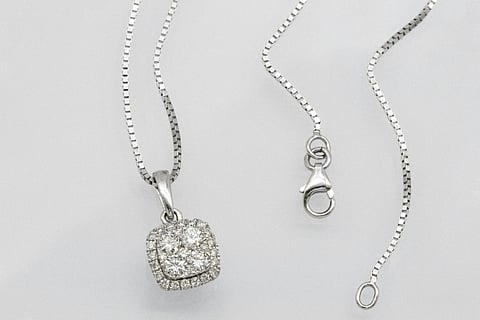
A pendant can disappear against a busy tablecloth. Put it on a quieter surface and the curve of its setting becomes easier to see. A Nano Banana Pro jewelry image starts with a decision like this: which part of the presentation needs changing, and which details belong to the piece itself?
Background studies are a useful place to begin. They let you explore a visual setting while giving you something specific to inspect. Keep an original photograph beside the experiment, because a convincing image can still contain changes you never requested.
Google identifies Nano Banana Pro as Gemini 3 Pro Image and documents image-editing capabilities. Its prompting guidance also acknowledges imperfect fine details and artifacts in complex edits. The practical job is to direct the scene and then decide whether the jewelry has survived the edit faithfully enough for your intended use.
Start with the actual piece in focus. GIA's guide to photographing gems and jewelry recommends stabilizing the camera and avoiding mixed lighting. It also explains how diffused light can help reveal polished metalwork without harsh reflections.
For a simple reference session, place the pendant against plain paper and steady the camera. Inspect the result before putting everything away. Can you distinguish the pendant from the chain? Is the edge of the setting visible? If a bright reflection covers a feature you care about, adjust the physical setup and take another photograph.
Photograph the back as well if it carries an engraving or construction detail worth recording. GIA's separate gem-photography tips recommend documenting front and back views. Keep those photographs together, even if only the front view enters the editing brief.
Choose one main image for the background experiment. Additional views are useful for your own inspection, but a pile of references needs an explanation of what each one contributes. Google's Pro guide recommends assigning a role to each uploaded image.
Choose the backdrop before requesting other changes. Pale paper, dark fabric and a stone surface are different visual decisions. Decide which one would suit the piece, then describe its texture and how much of the frame it should occupy.
For a background study with Nano Banana Pro, try a brief structured like this illustrative example:
Use the supplied pendant photograph as the subject reference. Replace the tablecloth with a plain charcoal-gray matte surface. Keep the pendant and chain in their current positions and at the same apparent size. Preserve the visible setting, chain links, engraving and stone color. Leave open space above the pendant. Do not add lettering or other jewelry.
This is a proposed instruction, not a tested result. Replace the pendant details with what is actually visible in your photograph. If there is no engraving, remove that part rather than encouraging the model to invent one.
Leave the light alone for the first attempt. Once you have a background candidate worth keeping, you can decide whether another adjustment is necessary. This sequence gives each version a clear purpose: you are evaluating a surface change before introducing a separate lighting choice.
When a mood reference is helpful, identify it explicitly as a background reference. A photograph of another necklace should not silently become the pattern for yours. Write down what you want from that image, such as the muted fabric color, and exclude its jewelry from the request.
Enlarge the original and edited images to a comparable viewing size. Begin where the jewelry meets its new surroundings. A delicate chain needs a continuous edge; the open space inside a loop should remain open. Check whether the background replacement has swallowed a link or filled a gap in the setting.
Move inward next. Count visible stones where the source makes that possible. Compare the outline of the pendant and read any engraving. A decorative flourish that looks plausible may still be absent from the real piece. If you cannot resolve a tiny detail in the source, take a closer photograph instead of accepting a generated interpretation as confirmation.
Check color separately from atmosphere. GIA's photography advice treats color correction as a way to match the actual gemstone, and cautions against changing visible characteristics such as inclusions or worn facet edges. A richer shade in the edited image is not, by itself, an improvement.
For another candidate, GPT Image 2 also supports image editing. Use the same source photograph and written brief, then apply the same inspection. This creates a consistent basis for choosing between images; it does not establish that either model is more accurate.
Keep the rejection reason short and concrete: “extra link beside clasp,” “engraving changed,” or “stone became darker.” These notes tell you what a revision must address. They also make it easier to stop when the background is attractive but the object keeps changing.
Save the accepted image under a name that identifies it as an edited composition. Retain the original photograph and any detail views alongside it. When sharing, describe the generated background clearly, particularly if someone might otherwise assume the whole scene was photographed.
If exact detail is essential and the generated result fails the comparison, use the original. You can also keep the photographed jewelry as a separate layer in an image editor and build the background around it, checking the cutout edges carefully. That is an additional editing task, but it leaves you in control of which part of the image is replaced.
The useful outcome of a Nano Banana Pro jewelry study is a considered presentation you have inspected. Choose the backdrop that lets the piece read clearly, keep the source photograph, and reject even a beautiful scene when it changes the jewelry you meant to show.
Inspired by what you read?
Get more stories like this—plus exclusive guides and resident recommendations—delivered to your inbox. Subscribe to our exclusive newsletter
The products and experiences featured on RESIDENT™ are independently selected by our editorial team. We may receive compensation from retailers and partners when readers engage with or make purchases through certain links.